The questions that come up in every first call, and the answers we’d give there, too. No marketing filter.
If yours isn’t here, you’ll find an address below where a real person replies.
Questions
43 · all real
Updated
May 2026
Read time
≈ 13 min
Language
EN · DE available
/ 01
We already have Microsoft Copilot. Why Knowmetheus?
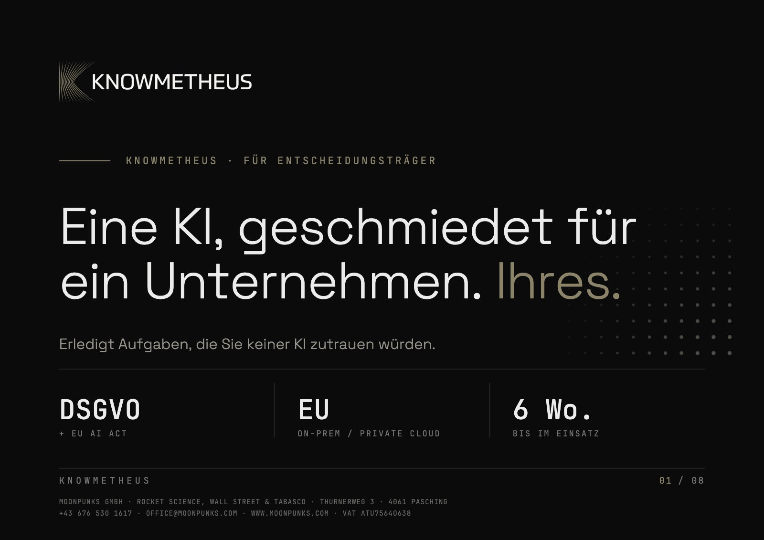
Copilot is built for everyone who uses Microsoft 365. Knowmetheus is built for one company: your processes, your rules and your systems, inside and outside Microsoft.
Many clients use both: Copilot for everyday Office work, Knowmetheus for the work that has to be right.
CopilotMicrosoft 365Differentiation
/ 02
How is Knowmetheus different from general-purpose AI?
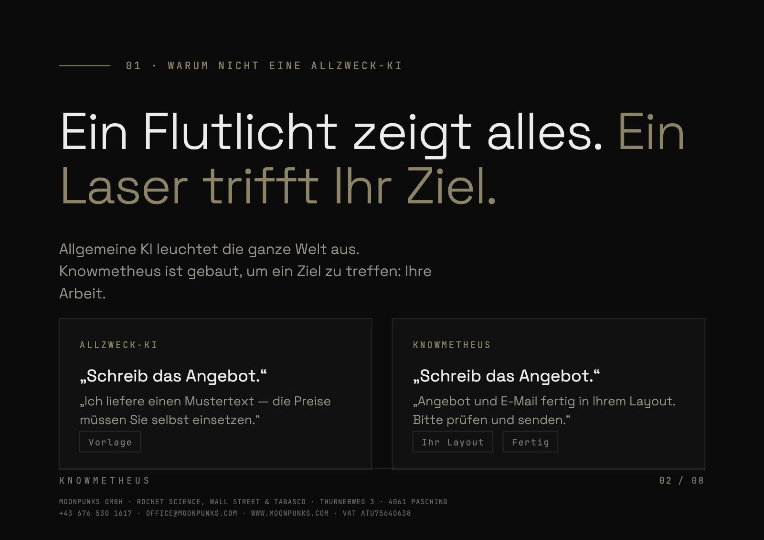
A floodlight shows you everything. A laser goes exactly where you point it. General-purpose AI lights up the whole world; Knowmetheus is built to hit one target: your work.
Frontier models are impressive, and generic. They know nothing about your archive, your templates, your compliance rules, the way your analysts expand acronyms. Knowmetheus is a separate system per company, forged around your data, your workflows and your tone of voice.
Pragmatically: if a generic model with web search is enough for you, you’re better off with general-purpose AI: it’s cheaper. If you want a 200-page diligence pack in your template and with your citations finished in an hour, you’re not.
House rulesVersion 11 · Last updated Mar 20, 2026
v11Müller GmbH framework agreement: delivery within 14 days of call-off, penalty from day 15 (§ 7.2).Added by Sales · 20.03.2026
v10In August, the deputy signs off instead of the department head: company holidays.Added by HR · 19.03.2026
v9“Project North” means the Hamburg site, not the sales territory.Added by project management · 12.03.2026
v8Müller GmbH: always CC Dr. Weber. Never email purchasing directly.Added by key account · 27.02.2026
v7Safety-related controls: performance level per ISO 13849 must be PL d or higher.Added by safety engineering · 04.02.2026
v6Commercial policies with business-interruption cover: flag any indemnity period under 12 months.Added by the broker · 15.01.2026
v5Non-standard quotes go out only after QA has signed off.Added by sales · 11.12.2025
Say it once. It sticks.
DifferentiationFrontier LLMBespoke
Asked byCTO · Mittelstand DACH
First raised2024-Q3
Answer calibrated● May 2026
/ 03
What does Knowmetheus do for management: concrete use cases?
How is Knowmetheus different from a simple search? Knowmetheus sits like a knowledge layer on top of all connected systems: drives, SharePoint, Teams, mailboxes and other sources. That way it captures the entire knowledge of your company. It understands the context of your question and knows which information from which system belongs to it: the contract from the drive, the figures from the report, the latest alignment from the mailbox, the minutes from the Teams channel. It assembles these pieces into a complete picture, evaluates them, checks the numbers and delivers a result you can work with directly.
How do I prepare for a supervisory board or executive board meeting? Knowmetheus gathers what is relevant from all connected systems: quarterly figures, project reports, open decisions, the correspondence of the past weeks. From this it produces a decision paper with key figures, deviations from plan and the points that need your attention.
Can Knowmetheus prepare an investment decision? Yes. Knowmetheus evaluates offers, cost breakdowns and market data, calculates payback, net present value or different scenarios and compares the options, including the assumptions the calculation is based on.
How do I find out why a KPI deviates from plan? Knowmetheus breaks the deviation down, e.g. by division, product or period. It then cross-checks it against reports, minutes and correspondence from the connected systems and shows the likely causes.
Can Knowmetheus review contracts? Yes. Knowmetheus analyses contracts for terms, notice periods, liability clauses and deviations from your standards. On request it compares several contracts and flags risks. The legal assessment stays with your experts.
Does Knowmetheus support due diligence or partner assessments? Yes. Knowmetheus combines your internal knowledge with current web research on companies, markets and competitors, evaluates financial figures and summarises opportunities and risks in a structured assessment.
How do I keep track of ongoing topics? Knowmetheus searches emails, minutes and documents across all systems for open commitments, deadlines and decisions. It summarises what is where, without you having to read it all yourself.
Can checks and standards be automated? Yes. With workflows you define how, for example, offers, reports or compliance requirements are checked. Knowmetheus then runs the check every time against the same criteria and documents the result.
ManagementDecision paperContractsDue diligence
/ 04
What does Knowmetheus do for research and development: concrete use cases?
Why is Knowmetheus particularly suited to research and development? Knowmetheus was originally developed for research and development. That is the basis of its precision: Knowmetheus understands formulas and calculations, reads figures, diagrams, technical drawings and sketches in detail, and handles technical terminology as precisely as technical questions demand.
How is Knowmetheus different from a simple search? Knowmetheus sits like a knowledge layer on top of all connected systems: drives, SharePoint, Teams, mailboxes and other sources. That way it captures the entire knowledge of your company. It understands the context of your question and knows which information from which system belongs to it: the test protocol from the drive, the measurement data from the spreadsheet, the alignment with the supplier from the mailbox, the decision from the project meeting. It assembles these pieces into a complete picture, evaluates them, checks the numbers and delivers a result you can build on directly.
Can Knowmetheus evaluate test and measurement data? Yes. Knowmetheus analyses measurement series and test results, performs calculations, detects outliers and trends and compares the results with earlier tests from your archive. Every calculation step remains traceable.
Does Knowmetheus understand technical drawings and sketches? Yes. Knowmetheus reads engineering drawings, circuit diagrams, charts and even hand-drawn sketches in detail. It recognises dimensions, labels and relationships and can check them against specifications or requirements.
Can Knowmetheus check formulas and calculations? Yes. Knowmetheus understands formulas in documents and publications, recalculates them, checks units and assumptions and makes errors or inconsistencies visible.
Does Knowmetheus support state-of-the-art research? Yes. Knowmetheus combines current research in specialist literature and public sources with your internal knowledge. You see what is already known, where your own results stand and where the gaps for new developments are.
How is knowledge from completed projects preserved? Knowmetheus keeps the knowledge from earlier projects, tests and reports available at any time, even when the people involved have left the company. Questions like “Have we tested this before, and with what result?” are answered in seconds.
Can standards and test requirements be checked automatically? Yes. With workflows you define how documentation, test reports or specifications are checked against standards and internal requirements. Knowmetheus then runs the check every time against the same criteria and documents the result.
Research & developmentMeasurement dataDrawingsFormulas
/ 05
Does Knowmetheus learn, and does a correction stick?
Corrected once. Kept for good.
ResultCorrectionRule
“Can we promise Müller GmbH delivery in three weeks?”
Yes, delivery in three weeks14 days, § 7.2 is possible.
“Quote for Müller GmbH, Project North: which delivery time?”
Hamburg site, delivery in 14 days, penalty from day 15. v9v11
No correction. Two rules applied.
House rulesVersion 11
v11Framework contract Müller GmbH: delivery within 14 days of call-off, penalty from day 15 (§ 7.2).Added by sales · 20.03.2026
v10In August, the deputy signs off instead of the department head: company holidays.Added by HR · 19.03.2026
v9“Project North” means the Hamburg site, not the sales territory.Added by project management · 12.03.2026
What is recursive learning? Recursive learning enables Knowmetheus to learn from corrections and company-specific requirements. Once established, rules and adjustments can be applied again to future tasks. The system evolves with the requirements of your company and delivers results that fit your way of working better and better.
Recursive learningHouse rulesCorrections
/ 06
How does Knowmetheus bring together the knowledge of every department, including what only lives in people’s heads?
What works together must be understood together.
One contract, one email, one delivery note: one answer.
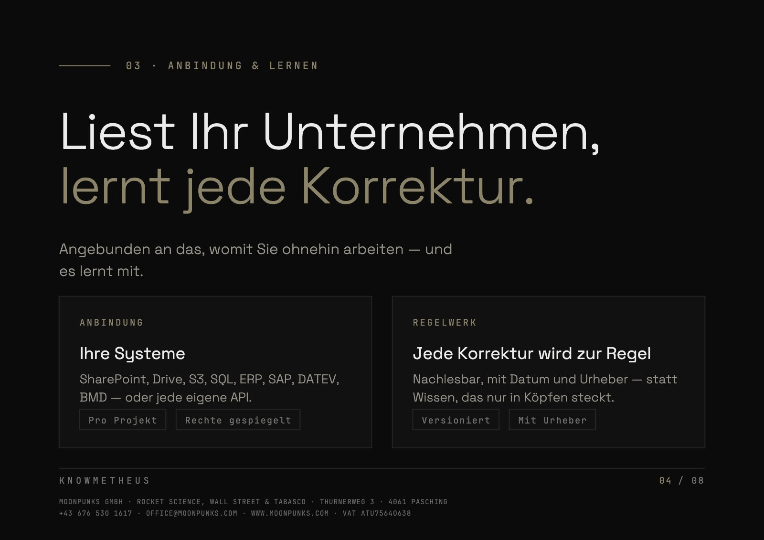
By reading what is already there and connecting it. Contracts, emails, plans, minutes, spreadsheets and ERP data stay in their systems. Knowmetheus opens them up together, so a question doesn’t stop at a department boundary. The framework agreement from Legal, the email from Purchasing and the delivery note in the ERP add up to one answer instead of three searches.
Search works by meaning, not by keyword, and in your language. A term that means something specific in your company is understood that way.
The knowledge in people’s heads comes in two ways. What your experts explain during the rollout, such as abbreviations, exceptions and unwritten rules, is recorded as a house rule. And every correction in day-to-day work is kept (Recursive Learning, question 05). That way, experience stays in the company, even when someone leaves.
Shared doesn’t mean everyone sees everything. Knowmetheus adopts the permissions of your systems: anyone who can’t open a folder won’t see it here either. Every statement points to the document it comes from. And the knowledge stays yours: your own instance, no shared pool with other customers.
All departmentsKnowledge from peoplePermissions mirroredWith sources
/ 07
How does Knowmetheus complete a whole task, not just a search?
From search to a perfectly finished task.
In six steps, from one short request. Take a trade fair: “Prepare our trade fair presence: a presentation in our CI and briefings on the 40 registered contacts.”
Search. Knowmetheus searches by meaning, not by keyword. It finds the styleguide, the logo, the website content and the contact list, although no file is called “trade fair”.
Connect. The hits are sorted: the presentation can be built entirely from your company knowledge. For the 40 companies there are only names, and that gap is recognised.
Deep Search. For the gap, Knowmetheus decides how many agents it needs, 200 here, and searches several search engines at once, 8 of up to 40 in the example. Every claim is confirmed twice, outdated material is dropped.
Workflow. The trigger “trade fair” is recognised and the matching workflow kicks in by itself. It holds what no AI can guess, defined once: purpose, rules, files and result.
Check. Slides against the CI rules, briefings against the sources. Anything that does not fit is fixed before output.
Hand over. The presentation as a PDF and 40 briefings, every claim with its source. The same again at the next trade fair.
The difference from a plain search: you do not get a list of hits, you get the finished result, in the right style and verifiable. How to set up a workflow yourself is explained under What is a workflow, and how do I create one?
Semantic searchDeep SearchWorkflowChecked before output
/ 08
Why doesn’t Knowmetheus answer as fast as other AI models?
Fast is easy. Right takes time.
Because Knowmetheus thinks before it answers. An AI model works more precisely and more reliably the more time it is given to think: it breaks the task down, weighs up approaches, checks intermediate results and discards errors before it answers. Knowmetheus is configured so that the model gets exactly the thinking time a task needs.
Thinking time is one of many settings that give Knowmetheus its precision. Added to it:
Planning. Knowmetheus first breaks complex tasks into individual steps and works through them one after another, instead of answering everything in one go.
Agents as needed. Knowmetheus estimates itself how many agents a task needs, for 40 suppliers roughly one per contract, and states the effort up front. If it exceeds the approved budget, Knowmetheus asks before it starts.
Source check. Every statement is checked against the documents it comes from.
Verification. Figures, names and deadlines are cross-checked before they go into the answer.
Check before output. The result is checked against your rules: house rules, templates and workflows.
We know that AI only helps a company if the results are right. A quick answer you then have to verify yourself saves no time.
You still do not have to wait. While Knowmetheus works on one task, you open another window and carry on there. Several tasks run at the same time, and every answer arrives in a quality you can rely on.
Thinking timePlanningAgents as neededSource checkCheck before output
/ 09
Which language does Knowmetheus answer in when our sources are multilingual?
By default, Knowmetheus keeps three language axes separate and never has to mix them: the language of the source, the language of the question, and the language of the answer.
A Dutch PDF stays quoted in Dutch, your German question stays German, the English in a board memo stays English, and the reply comes back in whichever language you asked for. Every language is supported out of the box; nothing needs to be enabled or unlocked. Just order, then ask.
MultilingualOut of the box
/ 10
Does Knowmetheus search the internet on its own?
Off by default. One click on the globe turns it on.
Web offWeb on@search What are our 40 competitors planning for 2027: prices, products, people?@search What are our 40 competitors planning for 2027: prices, products, people?
01 · DefaultOnly your sources. The web is off.
02 · @searchWeb on, for this request only.
03 · Deep Search200 agents, 8 search engines.
04 · Double-checkedAnything with only one source is dropped.
05 · Off againAnswer with sources, the web is off again.
No. The internet is off by default. Knowmetheus answers from your sources: the documents, systems and workflows that belong to your company. External search is never silently in the loop.
When you actually want the web, you switch it on per query: click the globe icon on the prompt, or write @search inline. That single gesture is the difference between a closed-room answer and an internet-augmented one, and you see, in the answer, which mode it was.
Why this design:
Data stays inside. No prompt, no source quote, no embedding leaves your tenant unless you explicitly ask the web in.
Predictable provenance. Every claim points back to a document that lives in your system, not to a page that may have changed overnight.
No drift. A web result that shifts hourly won’t quietly reshape an answer a colleague got yesterday. Internal answers stay reproducible.
Clean audit trail. Logs distinguish internal-only queries from web-augmented ones, exactly what your EU AI Act documentation wants to see.
No surprise spend. No background calls to third-party search APIs, no hidden token cost, no latency you didn’t ask for.
Result: the web is a tool you pick up when you need it, not a default that shapes every answer.
Opt-In Web@searchNo Auto-CrawlData Sovereignty
/ 11
Can Knowmetheus read scanned documents, handwriting and badly formatted PDFs?
You’ve heard it before: “We’d need to clean up our data first.” Not anymore.
Knowmetheus reads your company as it actually is: scans, handwriting, spreadsheets, email, ERP. Nothing has to move. Everything gets understood, in context.
No more retyping numbers. No more hunting through five systems.
SharePoint
Drive
Email
ERP
SQL
S3
Your solution
Spreadsheets
Diagrams
Formulas
Handwriting
Stamps
Drawings
Scans
Footnotes
A footnote in the contract, a note in an email, a line in the ERP: one thread.
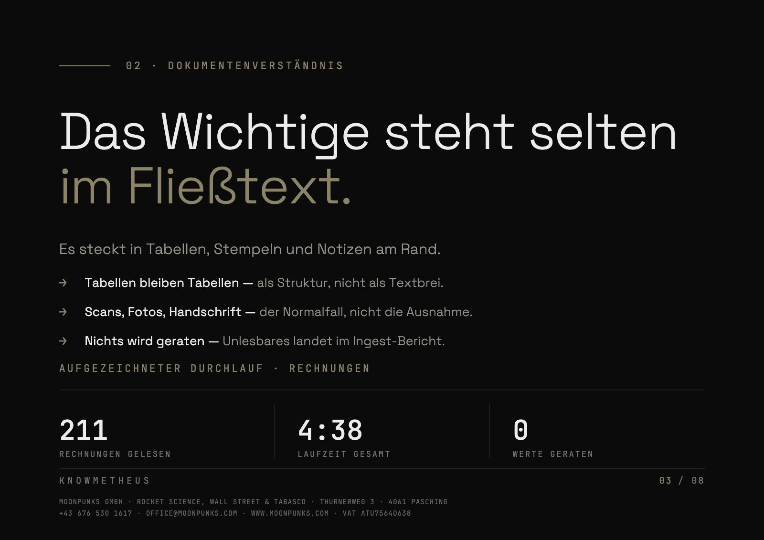
Yes, and well. Scans, handwriting and photos are the normal case, not the exception. Tables are reconstructed as tables rather than flattened into text soup, multi-column layouts are read in the right order, and handwritten notes and margin annotations are read along with the rest, even in the middle of a document.
Photos come from daily work, not from a studio: shot at an angle, with shadows, with a stamp across the amount. Knowmetheus finds what is written in them.
Where something genuinely cannot be read (a torn page, a completely blurred photo) the spot is flagged in the ingest report with its page number instead of a guessed value. Your team then knows exactly which twelve pages out of four thousand still need a human eye.
Archive quality remains the biggest variable in an ingest estimate. That is why we look at a real sample of your documents before we quote, never a number based on page count alone.
OCRHandwritingPhotosTablesIngest report
/ 12
Can it produce output in our own templates: Word, Excel, PowerPoint?
One prompt in. A presentation in your CI out.
TaskBuild me an 8-page presentation about Knowmetheus from the website content. Perfect corporate identity, audience: decision-makers.Build me an 8-page presentation about Knowmetheus from the website content. Perfect corporate identity, audience: decision-makers.
Yes. Output goes into your templates, not ours: your cover sheet, your heading hierarchy, your fonts, your legal footer, your numbering. Word, Excel, PowerPoint and PDF are supported; for Excel the result is a live sheet with formulas, not a picture of one.
Templates are set up once during implementation. From then on a workflow such as “quarterly supplier review” produces a finished document that a colleague could have written, including citations in the footnote style your compliance team expects.
Word · Excel · PPTYour CILive FormulasCitation Styles
/ 13
Which devices does Knowmetheus run on?
In the browser and on your phone. Knowmetheus runs in any current browser, at your desk, at home or on the road, with nothing to install. On your smartphone you use the same chats, files and workflows as at your desk.
Whatever you start on your phone, you continue on your computer: your history is the same on every device.
BrowserSmartphoneNo installation
Data & Security
/ 14
Does our data ever leave our infrastructure to train Knowmetheus?
Your data stays in the house. Even while learning.
01 · Your houseYour data stays in your infrastructure.
02 · Your instanceLearns only from your data, for you alone.
03 · The boundaryNothing goes into a shared pool.
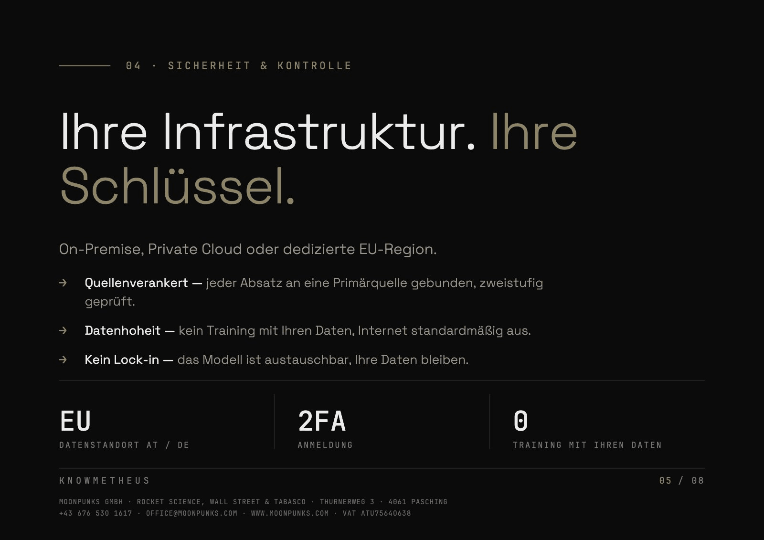
No. No model we run for others learns from your data. Your data never enters any shared training. Only if you want it, we train a dedicated model exclusively for you, in your instance, on your data, and it belongs to you. Knowmetheus runs either on-premise in your data centre, in a private cloud of your choice (e.g. Hetzner), or in a dedicated EU tenant operated by Moonpunks.
There are no shared models in which your data learns alongside other customers’ data. Your instance is your instance.
Data residency: EU / AT / DE, chosen per engagement
Audit logs: complete, exportable, visible to your side
GDPROn-PremPrivate CloudEU Residency
/ 15
What happens when the model hallucinates or misattributes a source?
Hallucinations happen when a model has to speak without a source. In Knowmetheus every paragraph is tied to a primary source: an internal page, a contract clause, a regulator filing, a URL. When the system can’t find enough support, it says so, instead of inventing a sentence.
A second pass verifies each claim against the source it cites: does the quote actually back the sentence, or has the model shifted the footnote? On any mismatch the paragraph is flagged, not shipped.
That makes errors unlikely, and, above all, findable. You see the plan, the sub-queries, the retrieved passages and the finished text. Every claim leads back to the document it came from. You don’t have to trust the model: you can check it, in minutes instead of weeks.
Source-anchoredTwo-pass verifyAudit trail
/ 16
How long is data retained, and can we delete a single document again?
Retention is your decision, not ours. You set the periods per source: chat history, uploaded documents, generated outputs and audit logs each have their own clock, and each can be set from days to indefinite.
Deletion is real deletion. When a document is removed, its text, its embeddings and its derived chunks go with it: the answer that once cited it will no longer retrieve it. Deletions are recorded in the audit log so you can evidence them.
Right to erasure. GDPR requests can be executed per person, per document or per source.
Export first. Everything can be exported before it is deleted: nothing is locked in a proprietary format.
Retention PolicyHard DeleteGDPR Erasure
/ 17
Does Knowmetheus store what it reads in a web search?
Web search without storage. Deep search with stamina.
No. Web search reads, it does not store. With @search or the globe icon you open the web for a single request. Knowmetheus reads the relevant pages, checks the claims against each other and writes the answer from them. Afterwards web search is off again, and nothing of the pages it read stays in Knowmetheus.
What happens along the way:
Deep search, not a sample. Knowmetheus decides how many agents a question needs, 200 in the example, and has them read in parallel across up to 40 search engines and specialist sources, 8 in the example.
Every claim confirmed twice. Anything not confirmed by at least two independent sources is dropped before it reaches the answer.
No copy in your company knowledge. Web pages are neither added to your documents nor kept for later answers. Your company knowledge contains only what you put in yourself.
Only search queries go out. Documents, files and chats from your company do not leave your infrastructure.
The origin stays visible. For every claim the answer names the source with a link. You can check it yourself, without Knowmetheus having to keep the page.
The result: you get the current state of the web, checked and with its origin, and your system stays as clean as before. How to switch web search on is explained under How do I turn on web search?
Web search without storageDeep Search2 sources per claimData sovereignty
Integration
/ 18
Can we connect Knowmetheus to SharePoint, SAP, DATEV or our own DMS?
Yes. Some connectors are ready off the shelf, others we build per engagement. SharePoint, Drive, S3, Confluence, Salesforce, HubSpot, SAP, DATEV, BMD: if it’s a system with a documented API or a sensible export, we connect to it.
What that means in practice: we don’t quote until we’ve looked at your stack. A first call, a list of systems, and we tell you which ones plug in fast, which ones need a proper adapter, and roughly what each takes. No upfront promises that turn into pain in week three.
One thing that’s always true: we only read what your permissions allow, and nothing beyond. An employee who can’t open a folder in SharePoint won’t see it in Knowmetheus either: rights are mirrored, never bypassed.
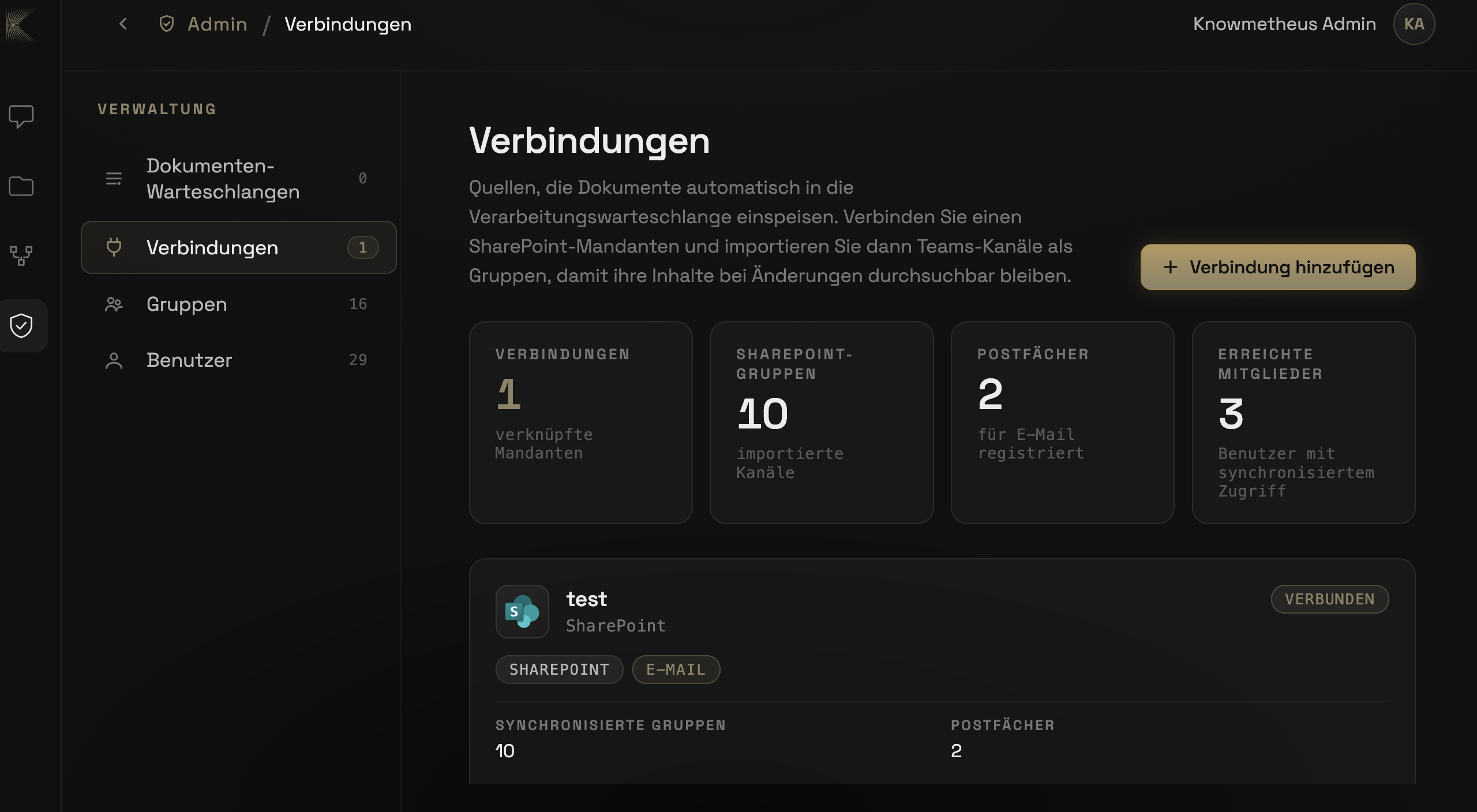
Your admin connects SharePoint and Teams directly. Under “Admin › Connections” the SharePoint tenant is linked, then Teams channels are imported as groups. New and changed documents flow into processing automatically and stay searchable. Mailboxes can also be registered for email.
Built Per EngagementACL MirrorCustom Adapters
/ 19
How long from the first call to go-live?
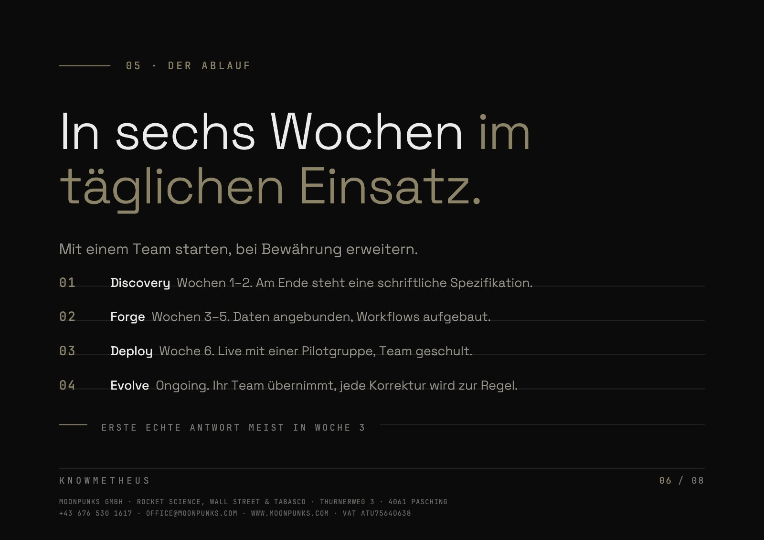
In most projects, six weeks from kick-off. Here is how they run:
Before the start · First call and offer
You tell us your systems and the tasks they cannot solve today.
We tell you which systems plug in fast and which need a proper adapter.
Usually within 48 hours you have a binding offer with the assumptions laid out in writing.
Week 1–2 · Discovery
Kick-off workshop with your team.
Getting to know the tech stack: systems, interfaces, permissions.
Workflow interviews: the people who do the work show step by step how a task runs today.
Data intake: sources, templates and your house rules.
Decided: deployment (on-premise, private cloud or EU region), first department, first workflows.
Week 3–5 · Forge
Knowmetheus is set up in your environment.
Sign-in via Entra ID, usually set up with your IT team in less than half a working day.
Documents are read in, including scans and handwriting. The ingest report flags every unreadable spot with its page number.
Week 3: the first usable answer to a real question from your day-to-day.
The tasks from the interviews become workflows, with output in your templates.
Week 6 · Deploy
Connecting systems: your admin links SharePoint and Teams, and we build the adapter for SAP, DATEV or your own DMS. Rights are mirrored.
Testing workflows: the first department works on real tasks.
We fine-tune: volume, templates and the edge cases that only show up in real use.
The workflows go live.
Afterwards · Evolve
Hands-on training on real tasks: your team learns to build and adapt workflows itself in the chat.
Your team takes over. More departments and systems follow.
Updates and support come from us.
/ 20
How long are we committed?
Twelve months from handover. After that, the contract renews for twelve months at a time unless you cancel four weeks before it ends.
The reason is the implementation effort: a Knowmetheus is set up for your company, not taken off a shelf.
Commercial & Ops
/ 21
Can we run a pilot with real data before we commit?
Yes. Most engagements start exactly that way. We set up Knowmetheus on a scoped slice of your data (one department, one product line, one regulator) and run it for four to six weeks against real questions from real users.
At the end you have something concrete to decide on: actual answers, actual citations, actual time savings, and a clear sense of whether the system fits the way you work. No screenshots, no theoretical demos.
The pilot is billed by effort; if you decide to roll out company-wide afterwards, the pilot setup carries over: nothing has to be rebuilt.
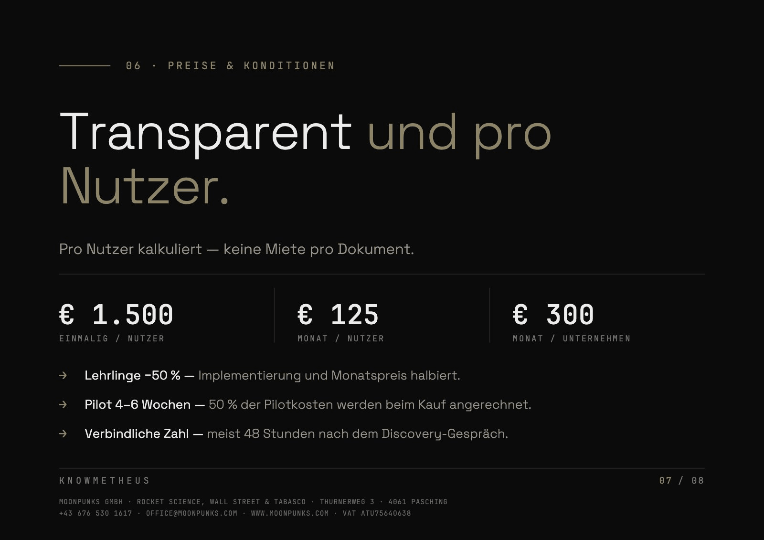
50 % of the pilot cost is refunded against the implementation fee once you acquire the system. In effect: half the pilot is on us, the moment you decide to keep Knowmetheus.
Pilot4–6 WeeksReal Data50% Credit on PurchaseNo Re-Build
/ 22
What does a Knowmetheus engagement cost?
We price transparently and per user. No monthly rent for a number of documents: once a document is initialised, it stays initialised.
€ 1,500 per user · one-time implementation fee
€ 125 per user / month · ongoing usage
€ 300 per company / month · service & security fee
Compute · billed by actual usage
Initial setup & document ingest · one-time, billed by actual effort: no recurring document fees afterwards
Apprentices: 50 % off. For trainees we cut both the one-time implementation fee and the monthly per-user fee in half. Bringing apprentices in early is good for everyone: we’d rather see them on the system than charge them off it.
A binding number comes after the first discovery call, usually within 48 hours, with the assumptions laid out in writing.
Per UserNo Doc RentCompute by UsageApprentices −50%
/ 23
Who operates Knowmetheus after go-live?
It depends on the deployment variant.
Cloud and dedicated EU tenant: we operate the system, included in the monthly service & security fee. You get a running system; we keep it running.
On-premise and hybrid: you operate the infrastructure (hardware, network, backups, access control). We provide updates, maintenance and support for Knowmetheus itself, over a secured remote connection.
In both cases there is support from real people on the channels you already use, not a chatbot loop.
CloudOn-premiseSupport included
/ 24
Who takes care of updates?
We do. You don’t have to do anything. New features, model updates and security fixes are rolled out for you, including on-premise installations. There are no versions for you to install or maintain yourself.
Your workflows, templates and data remain unchanged with every update. When a model improves significantly, we test it against your real tasks before adopting it.
Updates includedNo effortOn-premise
/ 25
Do you offer training?
Yes, two kinds.Hands-on training: we train your staff directly in their actual applications, on real tasks from their day-to-day work, not on sample data. Every department learns exactly what it needs. Along the way, your staff also learn how to build Knowmetheus workflows simply in the chat.
What a Knowmetheus workflow is: a recurring task as a fixed sequence (with your templates, rules and sources) that Knowmetheus runs on request.
How to build one: describe in the chat what should be done. No code, no IT needed.
What it brings: routine work runs with one click, the same way every time and traceable. Knowledge stays in the company, and your team builds new processes itself, without waiting for us.
AI literacy under the EU AI Act, with test and certificate: Anyone who has employees work with AI must, under Article 4 of the regulation, take measures that build their AI literacy. This applies to every company that uses AI, and you should be able to document it. Our training is that measure and delivers the proof along with it.
Content: how AI works, where it gets things wrong, what applies when handling data, and which obligations you have as a deployer.
Test: at the end, all participants take a test directly in Knowmetheus.
Certificate: those who pass receive a personal certificate. That is how you document who was trained and when.
Both formats take place on site or online. Get in touch if you would like to schedule a session.
Hands-on trainingEU AI ActTest and certificateOn site or online
Compliance & Practice
/ 26
Are you compliant with the EU AI Act, and how do you make sure we are, too?
Knowmetheus is built and documented so that you, as the deploying organisation, can meet your obligations under the EU AI Act: transparency on what the system is, traceable outputs, human oversight, technical documentation, logging, and a clear intended purpose per deployment.
The boundary matters: Knowmetheus is intended for knowledge management, research and workflows under human control, explicitly not for high-risk applications within the meaning of the regulation. If you are planning a use that might fall into that category, we tell you in the first call instead of settling it later in the small print.
Compliance on our side isn’t enough anyway: the regulation puts the duties on the deploying organisation. That is why we train your people: hands-on, in your language, with examples from your field. What applies in your context, what to log, when human review is mandatory. The scope of the training is set in the offer.
EU AI ActIntended purposeStaff training
/ 27
Who is liable if Knowmetheus produces a wrong answer that causes damage?
Responsibility for the use of the outputs lies with the customer. That is not an excuse but the logic of any professional tool: Knowmetheus supports your work, it does not replace the expert decision. Every answer carries verifiable citations, every workflow has a review step you control. The moment an output is acted upon, your organisation has decided to act on it.
Our own liability is set out in the Terms and can be read there: it exists, but it is limited, as is usual in software contracts between businesses.
Knowmetheus is built for precision: source-anchored answers, two-pass verification, a full audit trail. Like any AI system it can miss something in edge cases. That is exactly why every claim points back to a primary source: you don’t have to trust the model, you can check it.
Customer responsibilitySourcesAudit trail
/ 28
What do we tell our works council?
Bring them in before the pilot, not after. In our experience the objection is never the technology: it is the fear of performance measurement, and that fear is answerable with configuration rather than reassurance.
Knowmetheus is not a monitoring tool. Usage logs exist for security and AI Act traceability, and what they record is configurable: they can be aggregated, pseudonymised or restricted so that no individual usage profile is available to management at all.
We provide the technical documentation a works-council agreement needs (what is logged, who can see it, how long it is kept) and we join the meeting if it helps. Several of our clients negotiated their agreement with that document on the table.
How do we add and remove users, especially when someone leaves?
Through the systems you already use. With Entra ID or any SCIM-capable directory, provisioning is automatic: a new hire in the right group has access at their first sign-in, a departure in your HR system closes the account without anyone filing a ticket.
Offboarding is immediate and complete: sessions are invalidated, API tokens revoked, personal chat history handled according to the retention rule you set. What the person contributed to shared workflows stays; what was personal does not linger.
Without a directory, administrators manage roles in the interface. Either way, no one holds a permission that their role does not grant.
Can we sign in with Microsoft Entra ID (Azure AD)?
Yes. Knowmetheus integrates with Microsoft Entra ID (formerly Azure AD) via SAML 2.0 and OpenID Connect. Your administrators register Knowmetheus as an Enterprise Application in the Entra portal, we exchange metadata, and sign-in then goes through your familiar Microsoft tenant.
Group permissions sync automatically from Entra: whoever belongs to the “Finance” group in your Active Directory sees the workflows and sources released for “Finance” in Knowmetheus, and nothing else. Conditional Access, MFA policies and Risk-Based Sign-In from Entra apply unchanged.
Setup usually takes less than half a working day and is done together with your IT team.
Entra IDSSOSAML 2.0OpenID Connect
/ 31
What happens if we cancel, or leave later on?
At the end of the discovery phase you have a written specification. If it isn’t right, the project ends there: you pay for the effort incurred up to that point, and the specification is yours regardless.
If you decide to go ahead, the agreed minimum term starts at handover. What applies after that, and how a switch to another provider works, is set out in the Terms.
Your data and your outputs. The system builds no parallel archive: it reads your original files. Switch it off and your data stays unchanged, exactly where it is today. Customer data, inputs and outputs including metadata are exported in a common, machine-readable format.
Your rulebook is a readable document, not a hidden model state: you can see at any time which rule was added, when and by whom, and you can export it.
What stays with us is the software itself: models, indexes and the technical workflow logic. That is set out in the Terms and is the usual line between your content and our product.
Model: Leading models, open source included. Interchangeable: we are not locked to any vendor, and neither are you. Where off-the-shelf models hit their limits, we train our own on your data.
Your own model, when standard isn’t enough.
Trained on your data. Run on your infrastructure.
Base modelYour model
TerminologyGeneralYours
AnswersGenericIn your style
DataNever leaves the buildingNever leaves the building
Accuracy in your field
Documents: Knowmetheus reads what is actually in your files, not just the running text: PDF, Word, Excel, scans, photos, handwriting, plus tables, formulas and technical drawings in the middle of a document. That capability comes from R&D, where a document cannot be understood without it.
Knowledge: Semantic search across your own data, with embeddings we generate ourselves for your field and your terminology. A term that means something specific inside your company is found that way, not by general usage.
Deep research: With your approval, up to 40 search engines join in. The difference to the usual AI web search: instead of summarising the first hits, many sources are queried in parallel, weighted, opened and read. Contradictions between sources are named, not smoothed over. What comes back is what matters, with provenance, not a list of links.
Excel: A spreadsheet is hard for AI because there is barely any text in it. The meaning sits in the structure: which cell references which, what a formula actually computes, where a column holds an exception. Knowmetheus reads that structure and works inside it. What comes back is a living spreadsheet with formulas, not a picture of one.
Work: Agents and workflows carry multi-step tasks from start to finish: read, check, calculate, deliver. Output in your own templates.
Planning: Long, complex tasks are not answered in one go but planned and worked through step by step. Before anything is output, Knowmetheus checks the result against the task, the sources and your rules.
Team: Connected to SharePoint, Drive, S3, SQL, email and ERP. Group chats, so results reach the team instead of sitting in individual threads.
Security: Not a bought-in module but a part of the system itself: every request is checked before and after the model, permissions from your directories are mirrored, the internet is off by default. Runs on-premise, in a private cloud, or in a dedicated EU tenant.
Control: Every answer with a source, every action in the audit log. Your rules sit above the model, as a readable rulebook, not as hidden model state.
Built in-house: Most of this we built ourselves rather than assembled: document understanding, embeddings, the security layer, the workflow engine. That is why we can solve the edge cases a toolkit does not anticipate.
Own embeddingsDocument understandingDeep researchExcelSecurity layerBuilt in-house
/ 33
How does sign-in with two-factor authentication work?
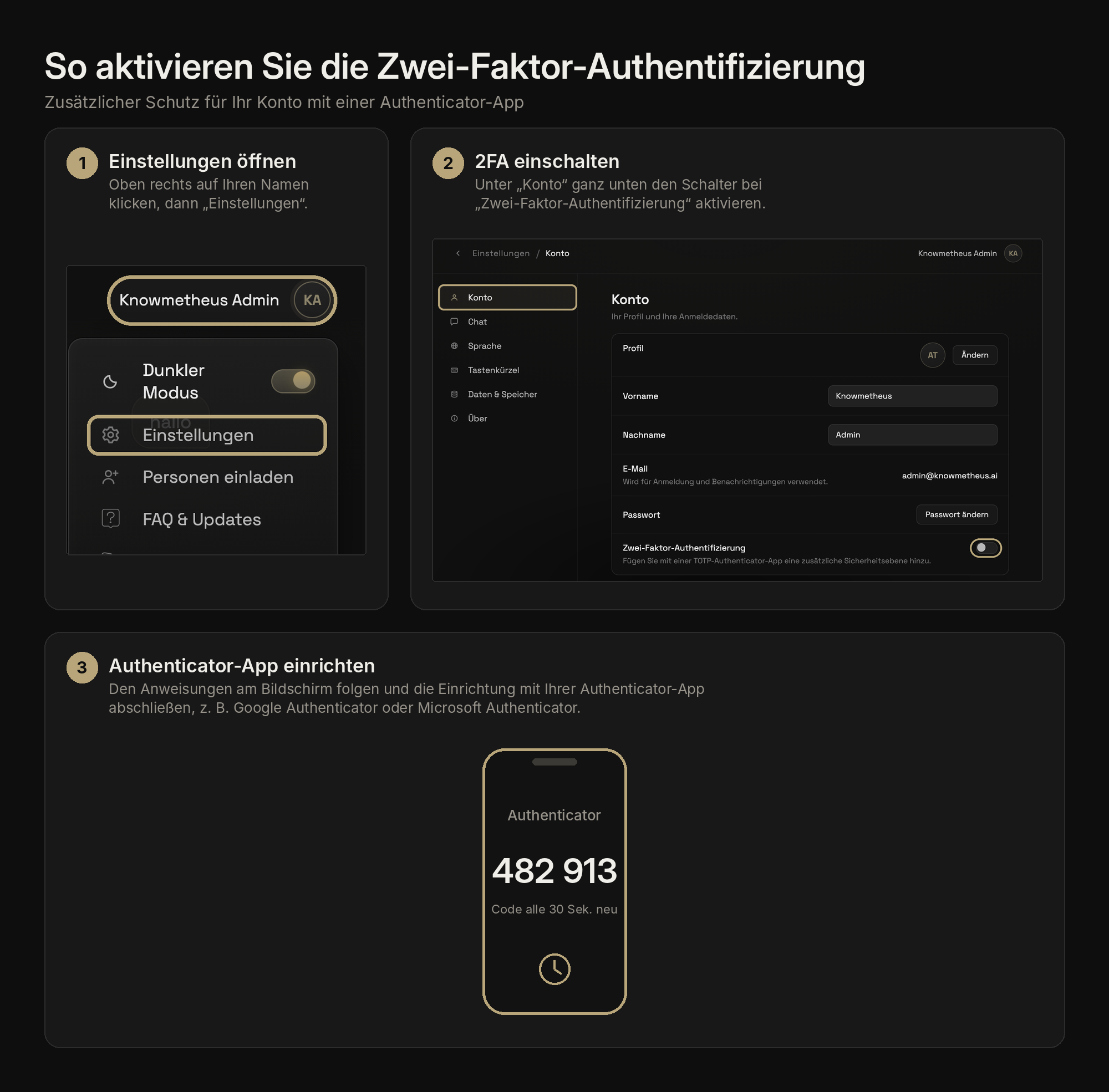
Knowmetheus supports two-factor authentication (2FA) by default. On first sign-in you scan a QR code with the authenticator app of your choice (Microsoft Authenticator, Google Authenticator, 1Password, Authy), then confirm with a six-digit code that rotates every 30 seconds.
Hardware tokens (FIDO2 / WebAuthn, e.g. YubiKey) are supported as well. Recovery codes are generated once during setup and should be kept somewhere safe: they’re the only way back in if the second factor is lost.
How to activate two-factor authentication: you need an authenticator app on your smartphone; we recommend Google Authenticator:
Open settings. Click your name at the top right, then choose “Settings”.
Turn on 2FA. Under “Account”, at the very bottom, switch on the toggle next to “Two-factor authentication”.
Set up the authenticator app. Follow the on-screen instructions and finish the setup with your app. From then on it provides the sign-in code, renewed every 30 seconds.
2FATOTPFIDO2Authenticator app
/ 34
How do I create a group chat?
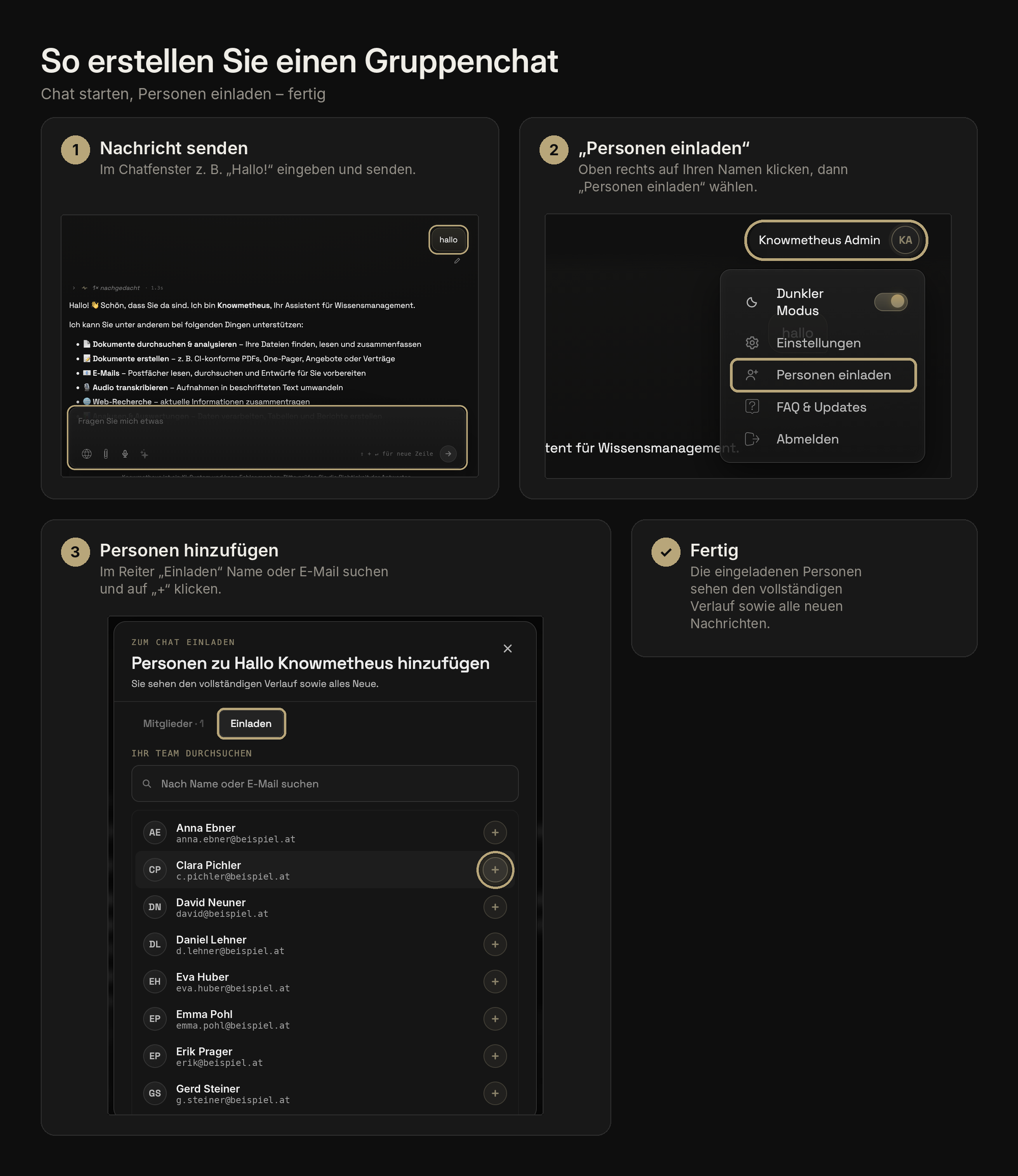
How to create a group chat. Start a chat, invite people, done:
Send a message. Type something like “Hello!” in the chat window and send it.
“Invite people”. Click your name at the top right, then choose “Invite people”.
Add people. In the “Invite” tab, search by name or e-mail and click “+”.
The people you invite see the entire history and all new messages.
Group chatInviteTeam
/ 35
How do I create a new group?
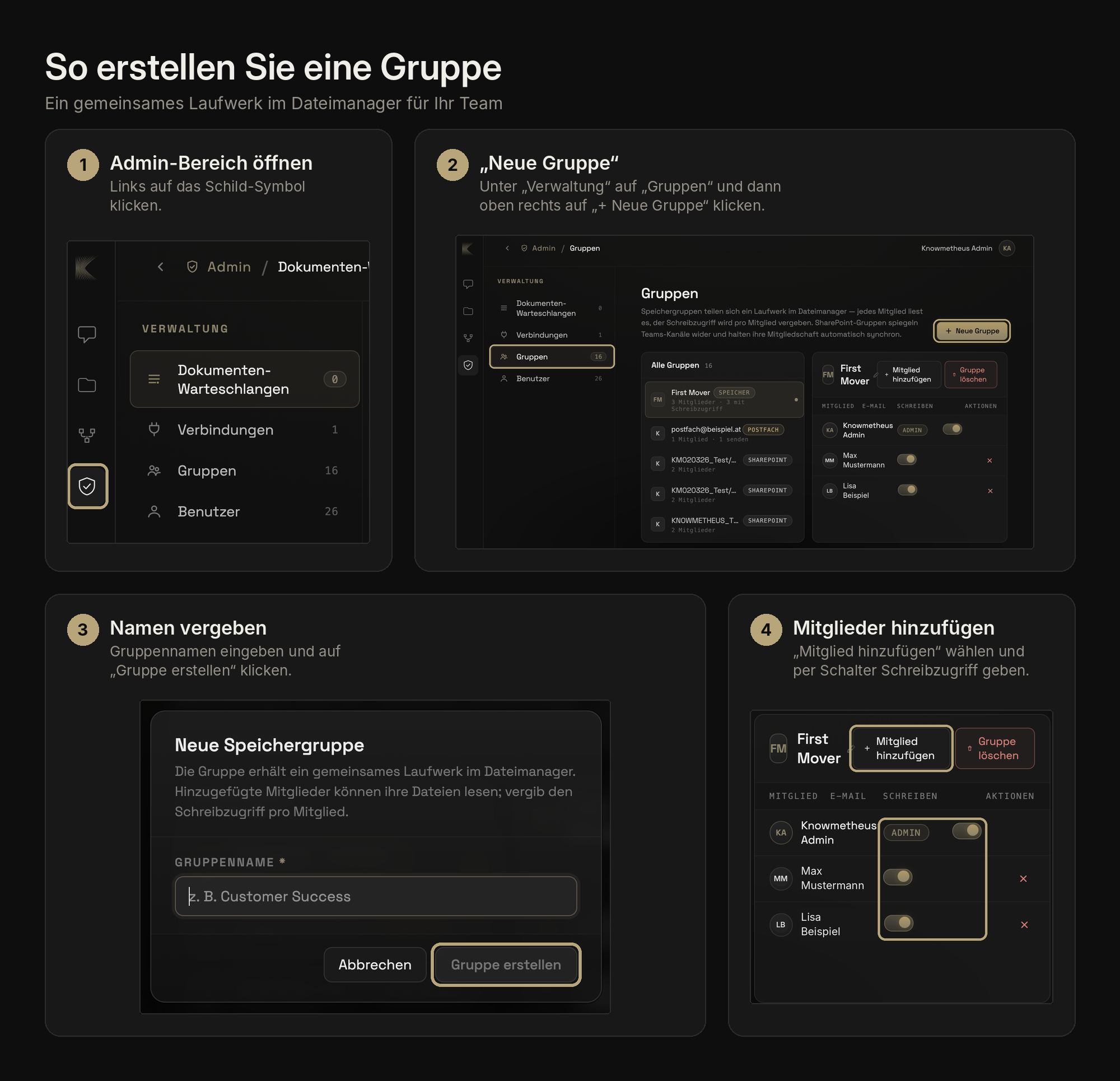
How to create a group: a shared drive in the file manager for your team. Every member can read; write access is granted per person:
Open the admin area. Click the shield icon on the left.
“New group”. Under “Administration” click “Groups”, then “+ New group” at the top right.
Name it. Enter a group name and click “Create group”.
Add members. Choose “Add member” and use the toggle in the “Write” column to give individual members write access.
The group then appears as a shared drive in the file manager of every member.
GroupFile managerAdmin
/ 36
How do I turn on web search?
Two ways, same effect: by default Knowmetheus answers only from your own sources. If you want it to search the internet for a particular question as well, switch on web search for that message:
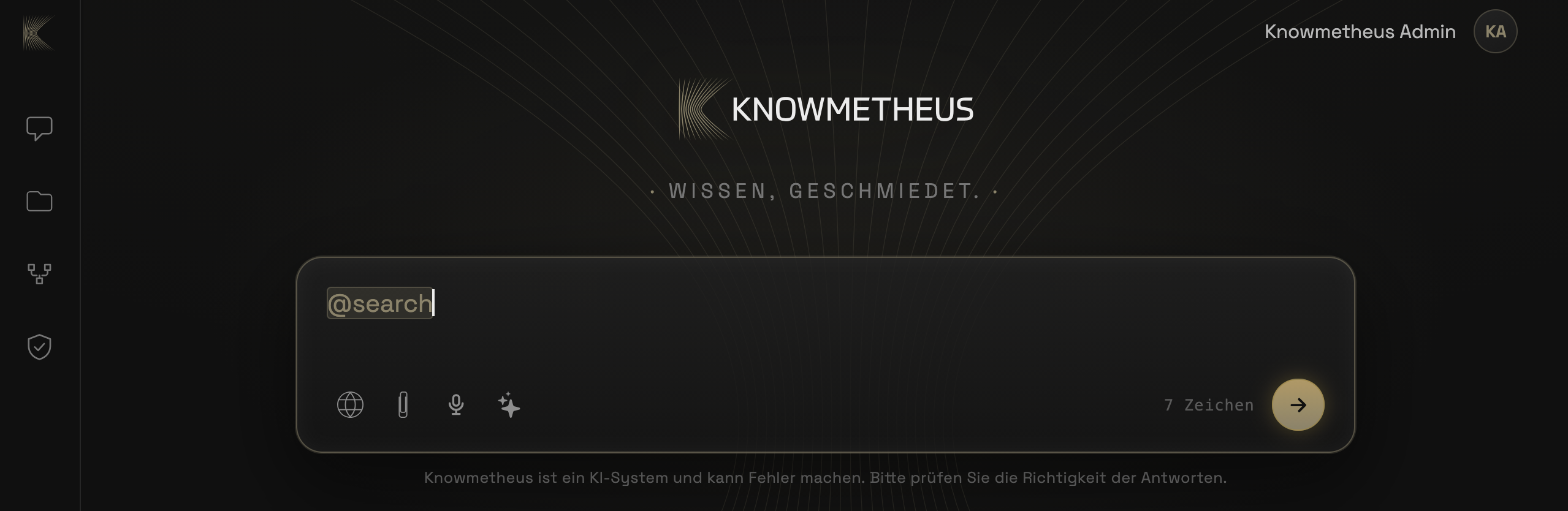
Globe icon. Click the globe icon at the bottom left of the input field: it lights up and web search is active for this message.
Or type @search. Start the message with “@search”, then write your question. The shortcut is highlighted and turns on web search.
Web search applies to that message only; afterwards it is off again. Internet sources are cited in the answer. Only the search queries go out; your documents, files and chats do not leave your infrastructure. Whether web search is available in your company at all is decided by your admin.
Web search@searchGlobe
/ 37
What is a workflow, and how do I create one?
A workflow is a reusable, verified playbook for one specific task. It bundles the company-specific requirements Knowmetheus cannot guess, as a fixed set of instructions, optionally with attached files (templates, logos, colour definitions). The task is then done the same way every time, correctly and in the right style, instead of being improvised anew.
What is it for? Whenever a task has exact requirements that are always the same:
Task
What the workflow provides
PDF in your corporate design
Colours, logo variants, fonts, spacing, export settings
Draft a customer quote
Price tiers, discount limits, standard clauses, mandatory attachments
Settle travel expenses
Fixed layout, mileage rate, approval rules
Digitise incoming invoices
Fields to extract, Austrian VAT/UID logic
How do you create one? You describe the purpose, nothing technical required:
Define the purpose. Which single task should the workflow cover?
Collect the specifics. Which rules, figures, files and requirements belong to it?
Define the trigger. When should the workflow apply, and when not?
Describe the result. What does “done” look like, and how is it checked?
Package & verify. Knowmetheus generates the ready-to-use workflow file and validates it automatically.
Example prompt for an “Employee onboarding” workflow:
“Create a workflow called “Employee onboarding”.
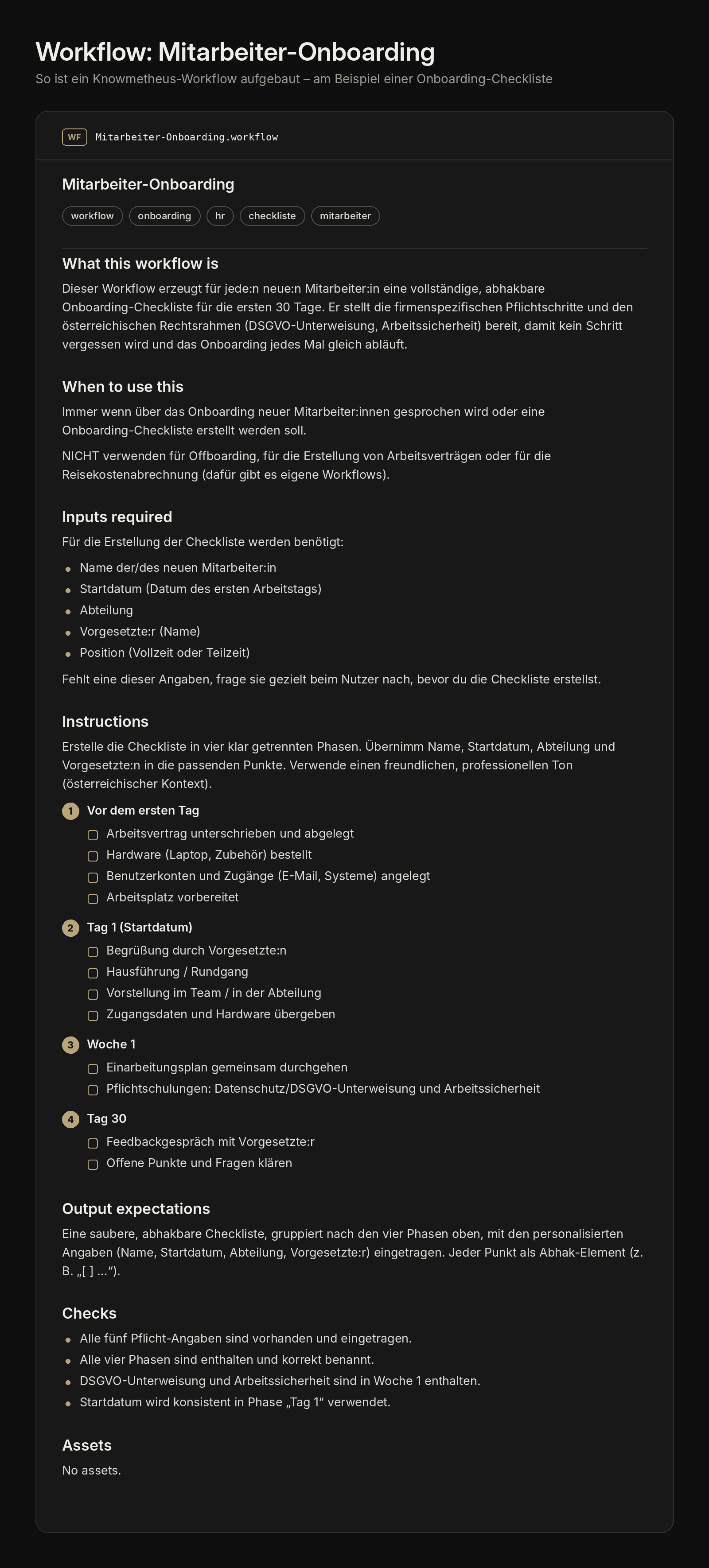
Purpose: generate a complete onboarding checklist for the first 30 days of every new employee. Inputs to collect: name, start date, department, manager, position (full-time/part-time). Checklist content: Before day one: contract signed, hardware ordered, accounts created, workplace prepared. Day 1: welcome, tour, introduction to the team, hand over credentials. Week 1: induction plan, mandatory training (data protection/GDPR, workplace safety), assign a buddy. Day 30: feedback meeting, clear open points. Requirements: Austrian context (GDPR briefing mandatory), friendly, professional tone. Result: a clean, tickable checklist grouped into the four phases. Trigger: whenever someone talks about onboarding new employees.”
This is what the finished workflow looks like:
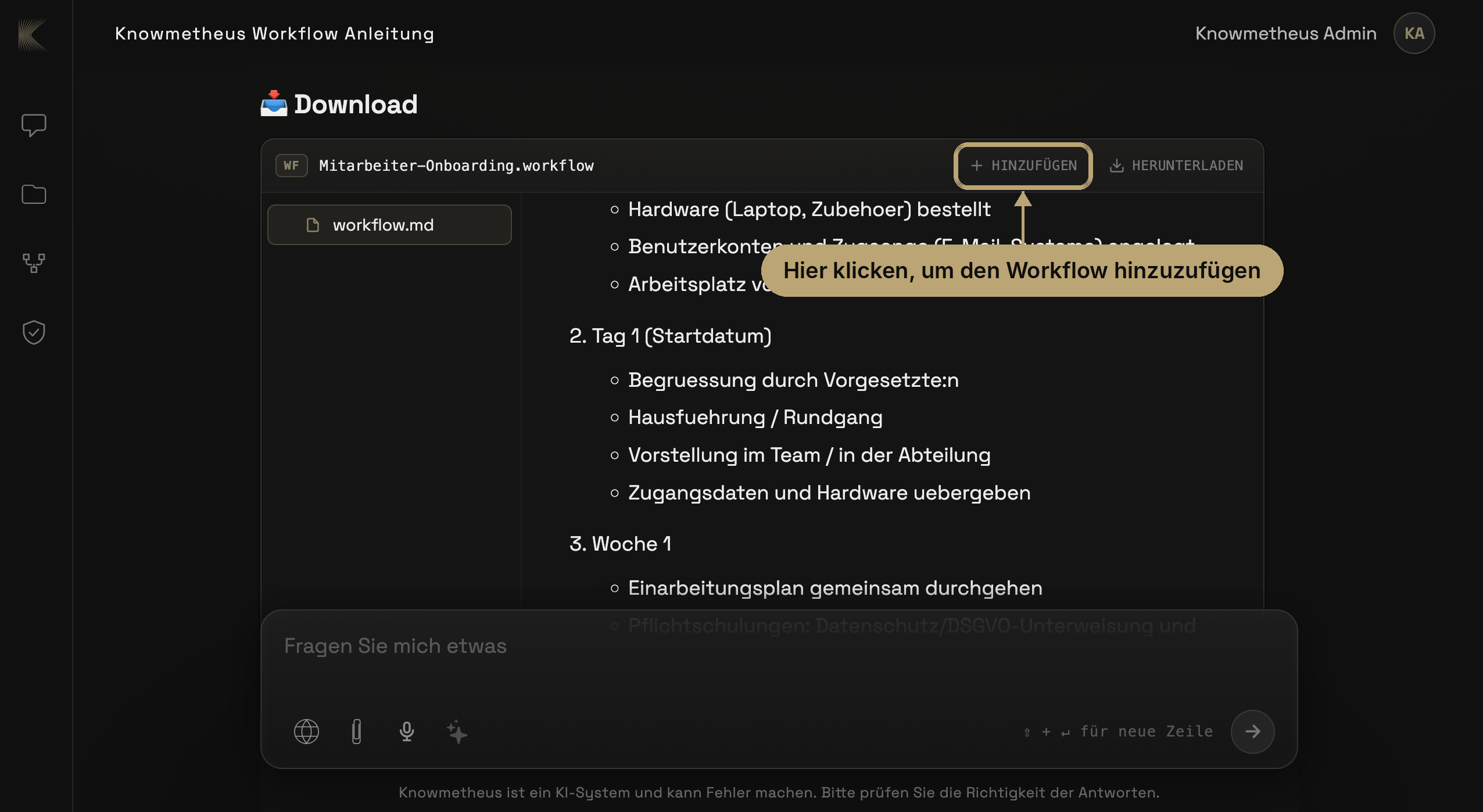
Add it: one click. Knowmetheus delivers the finished workflow as a file (e.g. Employee-onboarding.workflow) right in the chat. Click “Add” at the top right of the file. Only then is the workflow active in your system.
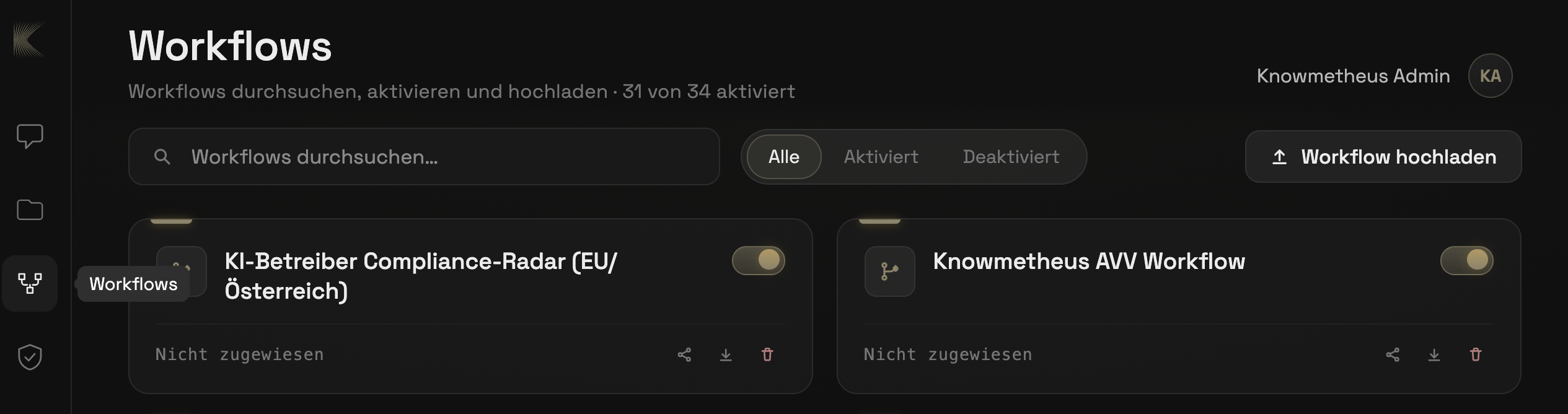
Where it lives. All added workflows are listed in the left sidebar under Workflows. There you can search, activate or deactivate, share, download or delete each workflow, and add your own files via “Upload workflow”.
Nothing more to do. An activated workflow is recognised and used automatically by Knowmetheus as soon as a task matches its trigger: you never have to call it. When someone talks about onboarding new employees, the “Employee onboarding” workflow kicks in by itself and creates the checklist to your specifications.
WorkflowPlaybookOnboardingAdd
/ 38
How do I upload files, and why do some of them fail?
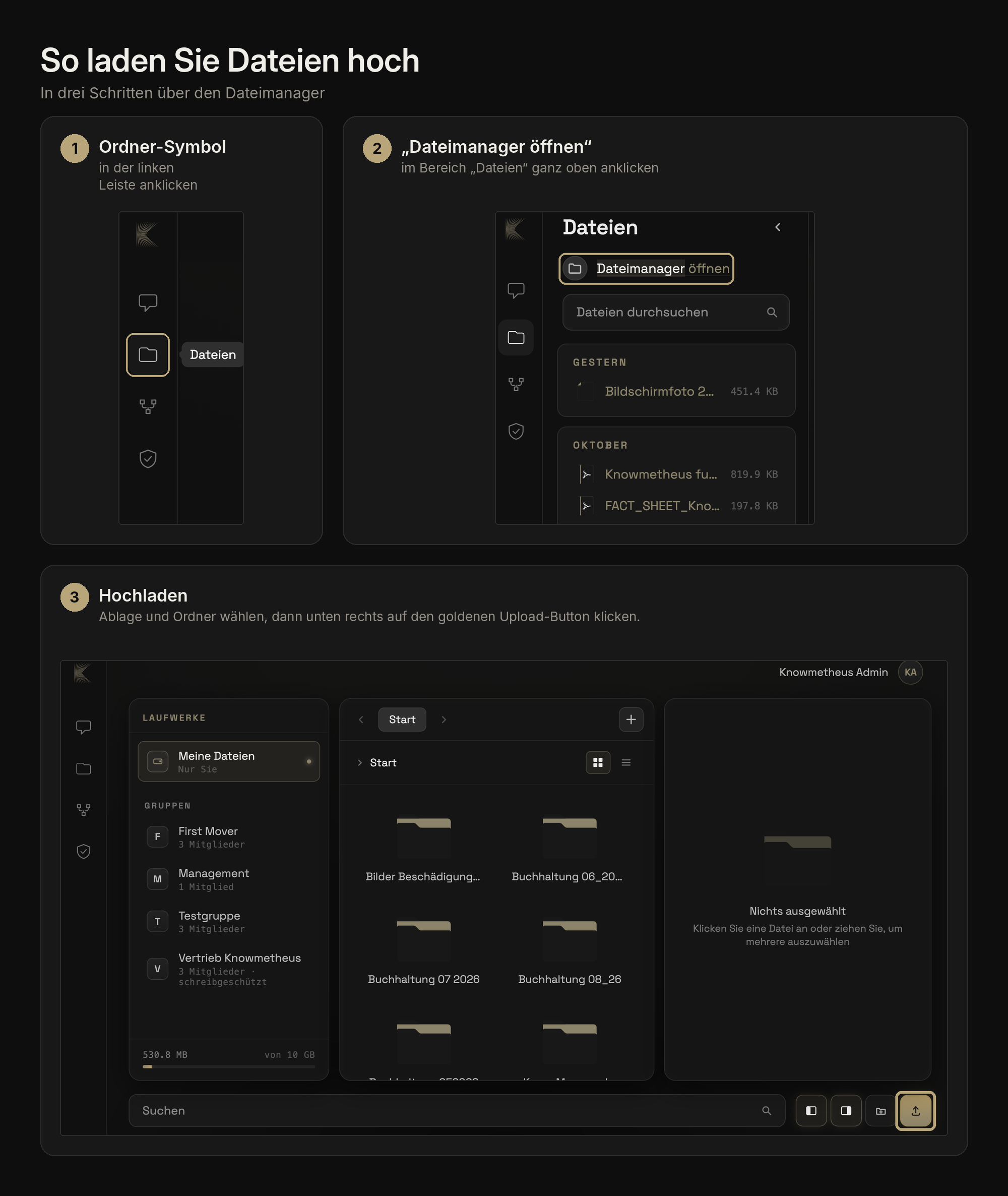
How to upload files, in three steps via the file manager:
Folder icon: click it in the left-hand bar.
“Open file manager”: click it at the very top of the “Files” panel.
Upload. Choose a drive and folder, then click the gold upload button at the bottom right.
File names with umlauts (ä, ö, ü, ß) or special characters can cause problems during upload, both as an attachment in the chat and in the file browser.
Solution: Rename the file before uploading. Use plain letters without umlauts, numbers, hyphens or underscores. For example, replace Mitarbeiterübersicht_Österreich.pdf with Mitarbeiteruebersicht_Oesterreich.pdf and upload the file again.
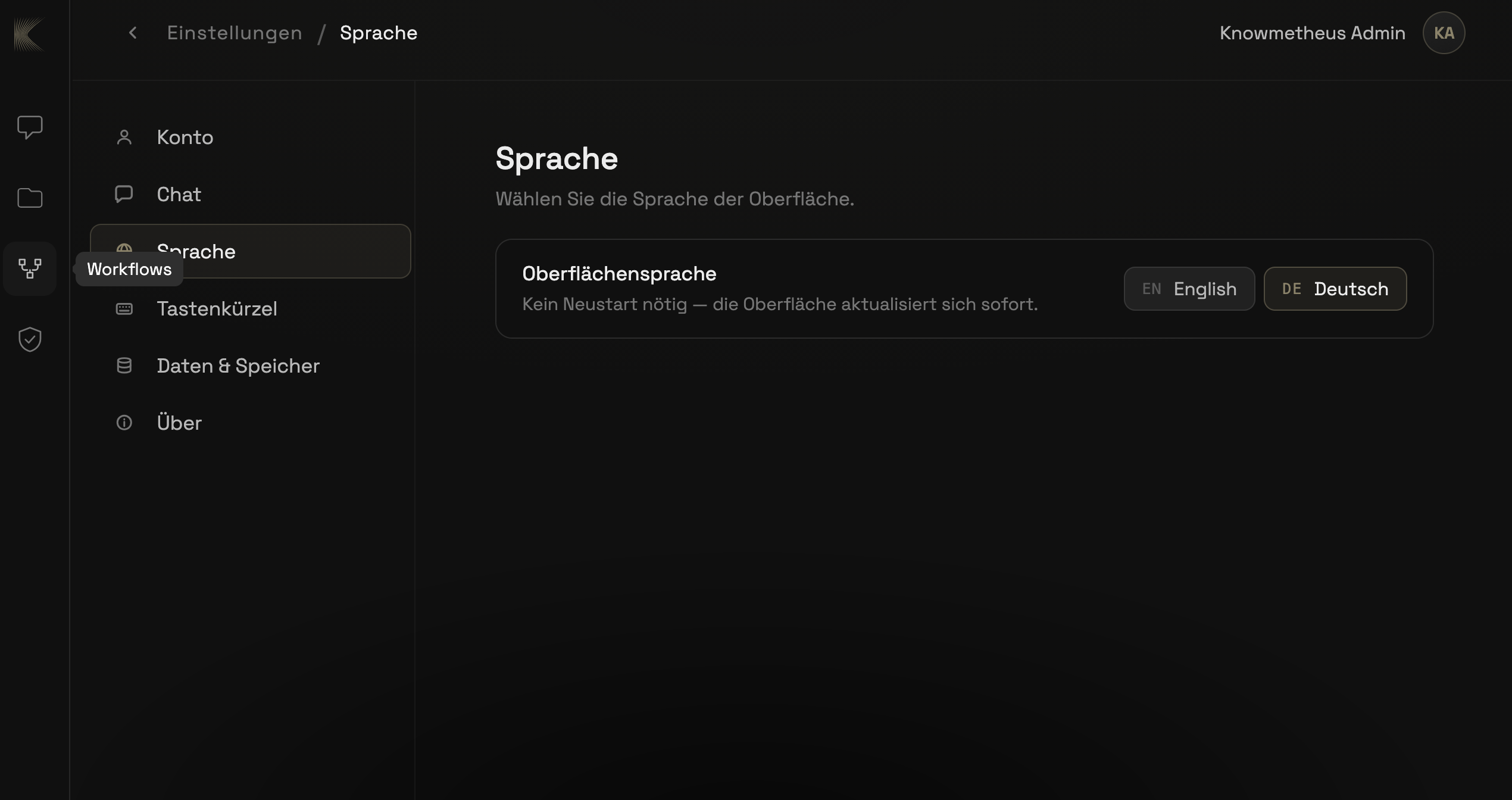
How to change the language: the interface is available in German and English, and the switch takes effect immediately:
Open settings. Click your name at the top right, then choose “Settings”.
Choose “Language”. Click “Language” in the left column.
Pick a language. Under “Interface language” click “EN English” or “DE Deutsch”. No restart needed: the interface updates instantly.
The setting applies to your account, not to the whole company: everyone picks their own language. The language of the answers is independent of it: Knowmetheus replies in the language you ask in.
LanguageSettingsInterface
/ 40
How do I export or delete my chats?
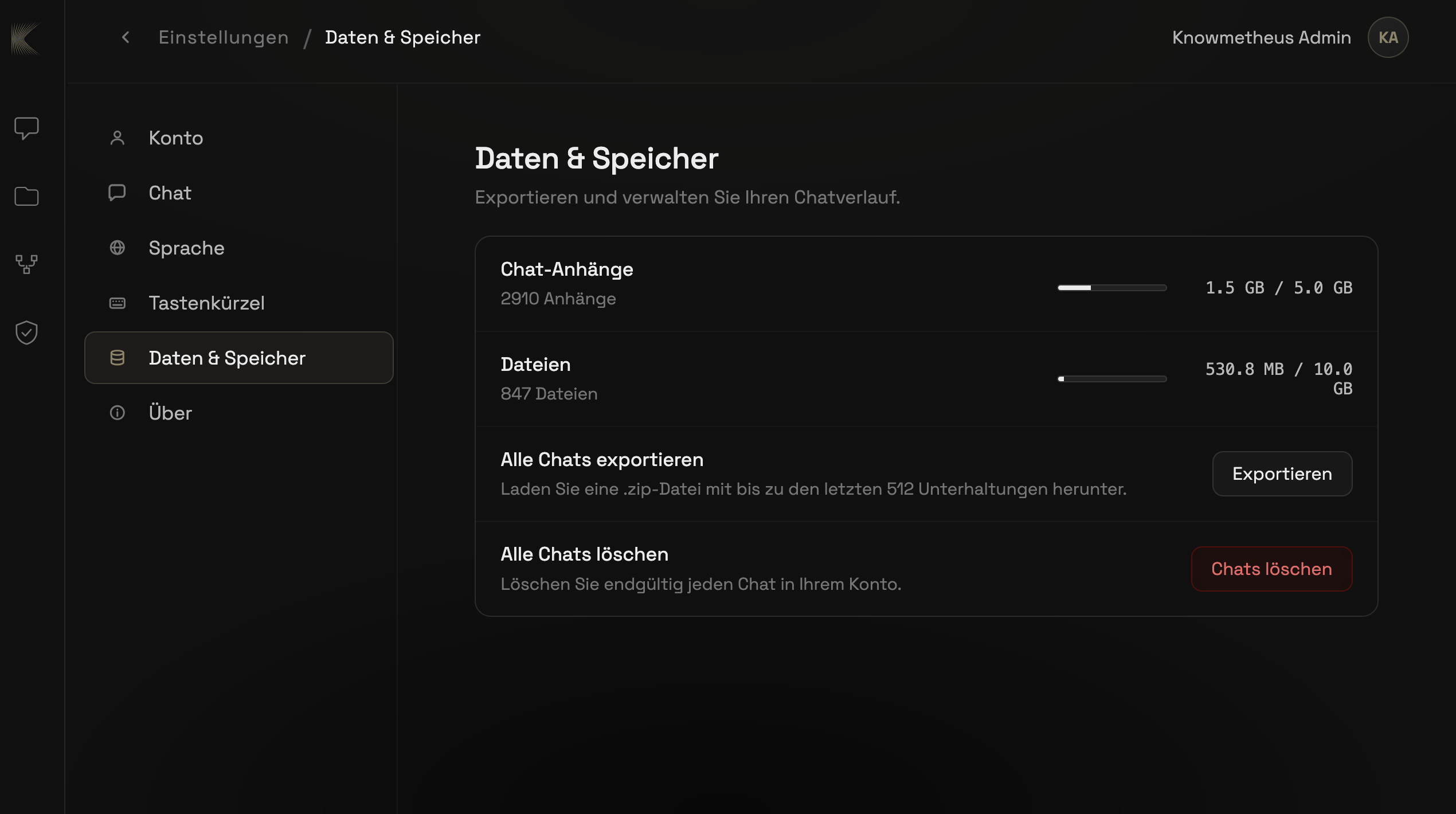
Export and deletion live in the same place: under “Data & storage” you can see how much space your chat attachments and files take up, and export or delete your history:
Open settings. Click your name at the top right, then choose “Settings”.
Choose “Data & storage”. Click “Data & storage” in the left column.
Export chats. Under “Export all chats” click “Export”: you get a .zip file with up to your last 512 conversations, to keep or pass on. If you only want to export, you are done here.
Delete chats (optional). Under “Delete all chats” click the red “Delete chats” button and confirm.
Please note: deletion is permanent and affects every chat in your account: there is no recycle bin. To delete a single chat, use that chat’s menu in the chat list. Your files in the file manager and other people’s chats are not affected.
Delete chatsExportData & storage
AI Taskforce · Modular engineering support
/ 41
What exactly is your “modular engineering support”?
Alongside our platform Knowmetheus, we support companies precisely where their own AI projects are technically stuck. We don’t do PowerPoint strategies or AI Act compliance consulting. We solve hard engineering problems either through advice or directly in the code. That can be, for example, connecting old legacy systems, extracting and generating metadata, or embedding-based semantic search.
Legacy systemsMetadataSemantic search
/ 42
How does working together look when our team is stuck on a hurdle?
Straightforward and without sales detours: you briefly tell us where your project is blocked and speak directly with one of our architects. Through our international network of experts we have the right specialist for almost any technical problem. Depending on what you need, we resolve your bottleneck as advice, in a short sprint or as a finished software module.
AdviceSprintSoftware module
/ 43
Do we have to use the entire Knowmetheus platform for this?
No. You can bring in our specialists completely independently of a platform rollout, for exactly the one technical blocker that is slowing your team down right now.
Question not in the list?
Then write to us. A real person replies.
We read every email ourselves. Within two business days you’ll have an answer from someone who understands what Knowmetheus does, and, more importantly, what it doesn’t do.